
POS Login
Every store's shared POS sign-in (its staff account) is set up
automatically — there is nothing to create. The moment a store is
added, Buddy Stall provisions its POS login: a 6-character store
code (e.g. K7MPX4) and, behind the scenes, a synthetic sign-in email
derived from it ({code}@pos.buddystall.com). Staff sign in with the
store code — typed into the Email or store code field,
case-insensitive, no @ needed — and a password you set. See
Sign in for that screen.
This page covers the one thing you have to do — set the password — and what happens to the POS login as the store changes over time.
Open the POS Login dialog
From the admin sidebar, open Stores and click POS Login on the store's card.
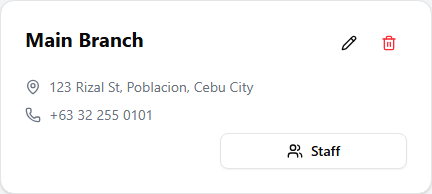
The dialog shows the store code (with copy buttons for the code and the derived login email) and the password form.
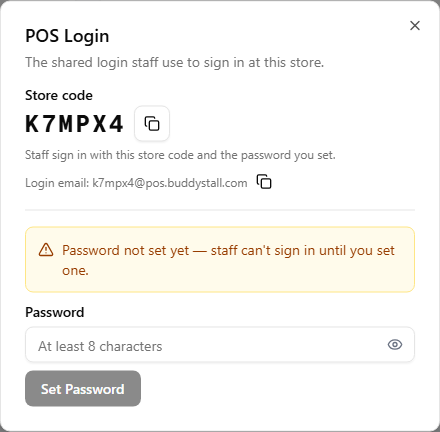
Set the password
The first time you open this dialog, no password has been set yet — the amber warning explains staff can't sign in until you set one. Type a password (at least 8 characters) and click Set Password. From then on, the device signs in with the store code and that password.
Change the password
Once a password exists, the same button reads Change Password instead — use it any time you want to rotate the device's password (for example after staff turnover). The dialog also shows the date the password was last set.
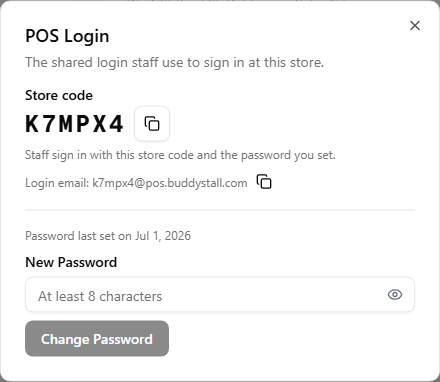
Staff can't reset the POS login's password themselves — its email address is a generated one nobody actually reads, so no reset email can reach it. If the store forgets its password, open POS Login from the Stores page and set a new one.
The POS login follows its store
The POS login belongs to its store, so store changes carry over automatically:
- Rename — renaming a store also renames its POS login's display
name (shown as
{store name} POSin User Management) — no extra step needed. - Delete — deleting a store removes its POS login with it.
- Archive — archiving a store just hides it; the POS login goes along for the ride and comes back unchanged if you unarchive the store later.