
Inventory alerts
BuddyStall watches each store's stock for you and raises an alert when an item needs attention — running low, going negative, or coming back from a stocktake with a count that doesn't match. Alerts are not something you create or manage: they appear on their own when the condition is met, and clear on their own once it is resolved.
This page explains the three inventory alerts, what raises each one, where you see it, and what makes it go away.
Where alerts show up
You never have to go looking for alerts — they come to you in two places.
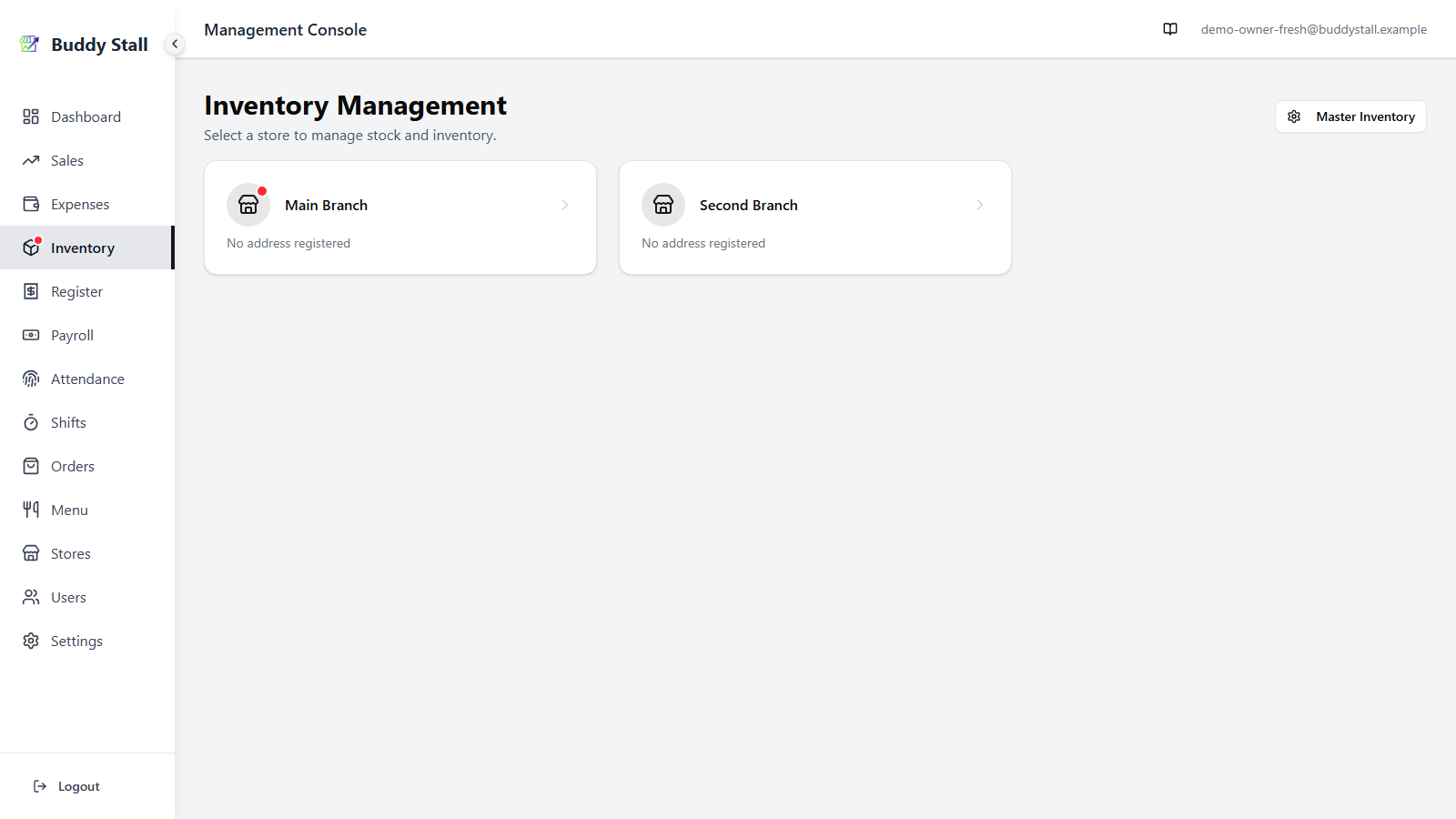
- The Inventory badge in the sidebar. When any store you can see has an open inventory alert, a small dot appears on the Inventory menu item. It is a single at-a-glance signal that somewhere needs a look; open Inventory and pick the flagged store to find what.
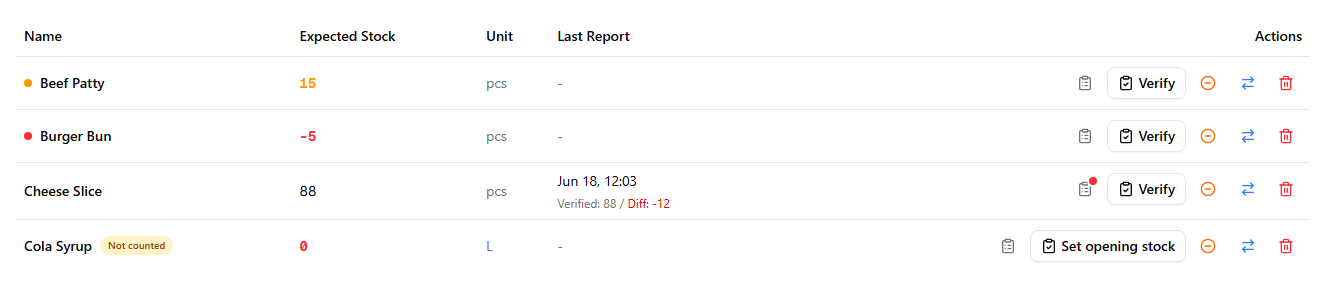
- On the store's inventory list. The item itself carries the detail — a coloured dot before its name, or a mark on its history icon.
Every inventory alert resolves automatically the moment the condition that raised it goes away — restock an item, fix a miscount, or recount it cleanly and the flag disappears on its own. There is no “dismiss” button, and nothing to tidy up by hand.
Low stock
The everyday re-order signal. Each ingredient carries a low-stock threshold set on the master inventory . When a store's count drops below that threshold, the item raises a low-stock alert — an amber dot beside its name and an amber Expected Stock figure.
Set the threshold high enough that the alert gives you time to re-order before the store actually runs out. It clears as soon as a restock (through Orders or Expenses) lifts the count back to the threshold or above.
Negative stock
The same stock-level signal, escalated. When a store's count keeps falling past the threshold and drops below zero, the amber low-stock flag turns into a red negative-stock one — a red dot and a red Expected Stock figure. Negative stock is impossible in real life, so the alert is telling you the app and the shelf have drifted apart.
The usual cause is a restock that was never recorded — stock arrived and was sold or used, but the purchase never made it into Orders or Expenses, so BuddyStall only ever saw it leaving. Less often it is a recipe that deducts too much per sale. Either way, fix it by recording the missing restock (or running a stocktake to set the count straight); the alert clears once the count is back to zero or above.
Stock discrepancy
The accuracy signal. When you run a stocktake, BuddyStall compares the count you entered against the count it expected. If the gap is large, in either direction — a surplus or a shortfall — it raises a stock-discrepancy alert: a small red dot on the item's View History (clipboard) icon, so you can open the history and see what happened.
How "large" is decided
BuddyStall measures the gap against how much of the item you consumed since the last count — everything you sold or wasted. When the gap reaches a set share of that consumption — 30% by default — the alert fires. When an item has barely been consumed since its last count, the gap is measured against its low-stock threshold instead, so everyday consumption doesn't trip a false alarm. You can tune this — the variance threshold lives in Notifications settings, where owners can also turn on a daily email of every discrepancy.
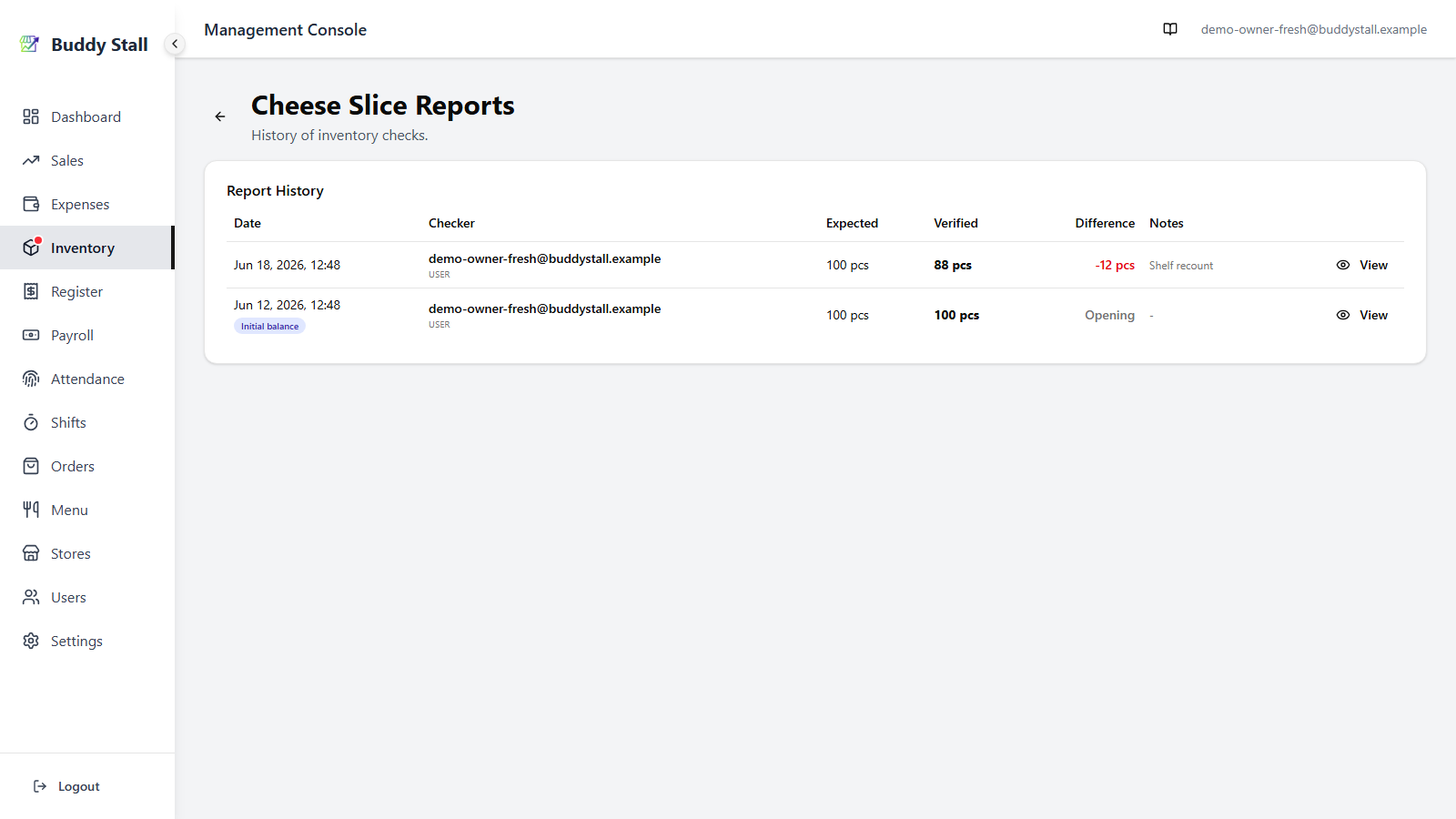
Cheese Slice from the shots above is a worked example. 40 units were sold since its last count, so that's the number the gap is judged against. The app expected 60 (down from the opening 100 as those 40 sold), the recount found 44 — a 16-unit shortfall. Since 16 is 40% of the 40 sold, past the 30% line, it flags.
A discrepancy is worth a second look: a big shortfall can mean unlogged waste or theft, a big surplus can mean an earlier miscount or a restock recorded twice. The alert clears when a later stocktake comes back within range — a clean recount resolves it automatically.
Two kinds of item never raise this alert, no matter how far the count lands from expected: ones no recipe uses, and ones still being set up. The next two sections cover each.
Items no recipe uses
An item is only deducted automatically when a recipe consumes it — that is how a sale knows to take stock off the shelf. Packaging is the usual example: you buy takeout boxes and count them, but no menu item lists them as an ingredient.
For those items, expected stock never moves on its own. It only changes when someone records a restock, waste, or transfer. So a count that reflects real day-to-day use will land below expected almost every time — not because anything is wrong, but because the sales that used the stock were never subtracted. A variance alert here would fire constantly and mean nothing, so BuddyStall does not raise one.
You can see it on the row: where a diff would go, the Last Report column reads Not in a recipe, and the history icon carries no dot.

Opening the item's report history says the same thing in full:

Only the variance alert is held back. Low stock and negative stock work exactly as they do everywhere else, and they are driven by the count you enter. So if you stocktake takeout boxes mainly to know when to reorder them, nothing is missing — keep counting, ignore the difference, and the low-stock flag will still tell you when you're running out.
If you would rather have the difference mean something, add the item to a menu item's recipe. From the next sale onward it is deducted automatically, expected stock starts tracking, and variance alerts switch on.
While an item is still being set up
A freshly registered item sits at zero with a Not counted badge until you declare its opening stock. During that window the low-stock and negative-stock alerts are held back — an item that hasn't been counted yet would otherwise flag low or negative purely because its starting count is zero. Once you set the opening balance (or the first restock arrives), the item starts tracking for real and its alerts switch on. See Set up your inventory.
What staff see
Staff get stock-discrepancy alerts only. Low-stock and negative-stock alerts are hidden from them on purpose: staff don't see Expected Stock (they count what's physically there), so a figure-based alert isn't something they can act on. Those two stay with owners and managers.
The discrepancy mark still tells staff their count came back far from what was expected — a sign the shelf and the app have drifted apart. It's a prompt to double-check the count (a miscount is the usual cause) and, if the number is right, to note the reason — breakage, an unrecorded use, expired stock — so the admin knows whether it's a counting slip or a real loss.