
Register History
Every register session staff open and close is saved. Register History is the admin-side record of those sessions, per store — who ran each shift, the cash they started and counted, any variance, and the full money breakdown behind it. Use it to review past shifts and audit cash handling.
Open it from Register in the admin sidebar (the receipt icon). If you haven't picked a store yet, choose one first; use Back in the header to switch stores later.
What's on this page
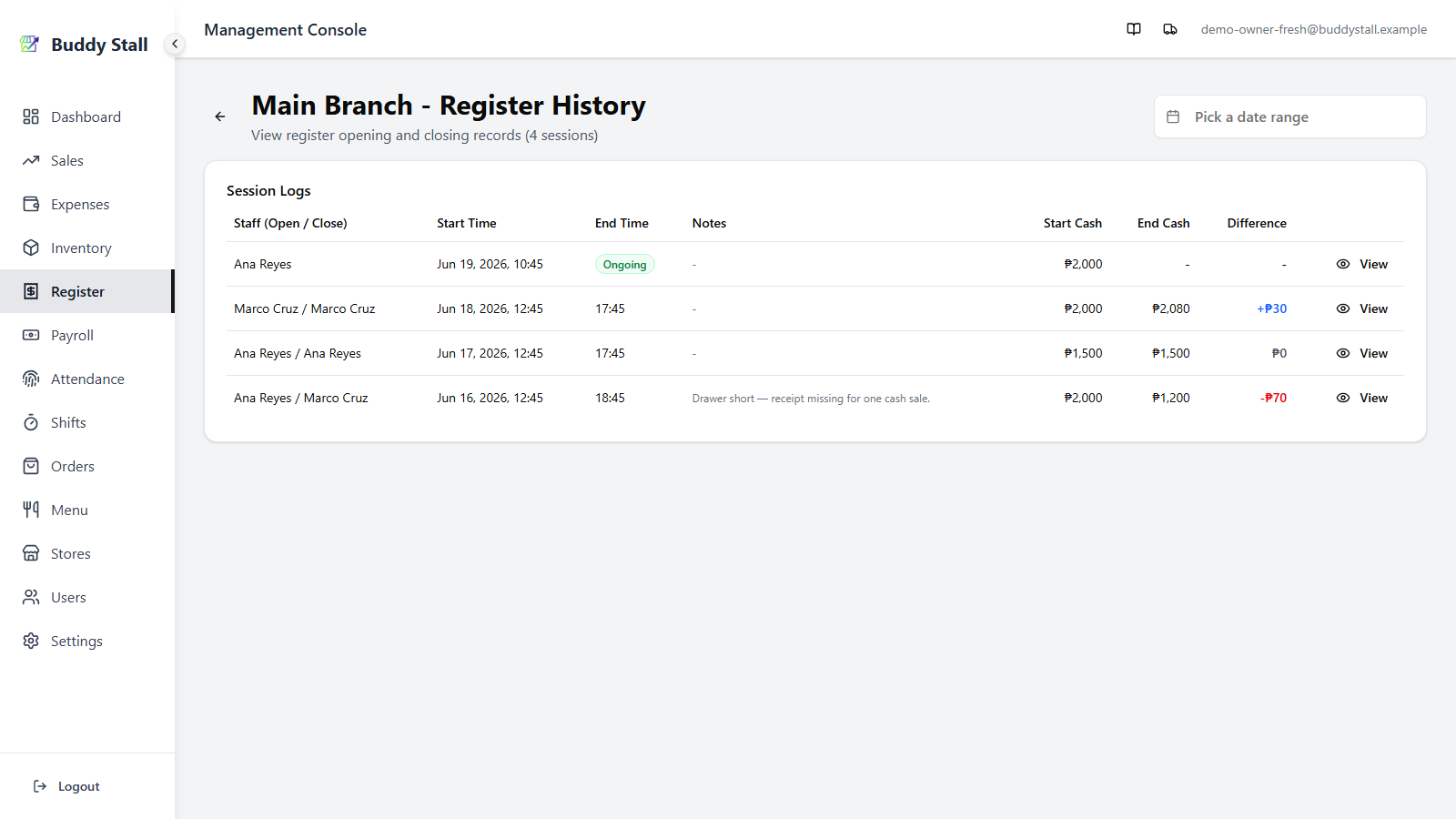
The page header carries the store name, the total number of sessions on record, and a date-range filter. Below it sits the record itself:
- Totals — bank deposit / remittance and cash difference added up over the dates in the filter, or over the last few days.
- Session log — every session for the store, newest first, as a table on desktop and stacked cards on mobile.
- Date-range filter — narrow the log to sessions opened within a chosen window.
- Session summary — the View button on any row opens that session's full close-out breakdown.
Totals
The Totals card sits above the session log and adds up the period you are looking at:
- With a date range picked in the page header, it covers exactly those dates, the same as the log below.
- With no date range, tabs beside the title pick the last 3, 7, 14 or 30 days, today included. It starts on 7 days. The tabs disappear while a date range is picked.
 12
12In both cases, only closed registers count, by the day the session opened.
1 Bank Deposit / Remittance — the total cash taken out of the drawer at closing across those sessions, with the number of closed sessions.
2 Difference — the net of every close, coloured like the log (blue overage, red shortage, grey zero), with the Overage and Shortage totals beside it.
Use it to check a week's or month's cash against what reached the bank and what's kept safe. Watch the Difference total too: if it keeps growing, open the closes behind it in the log below and fix the cause — an unrecorded expense, a deposit that wasn't entered, or a counting mistake.
The session log
Sessions are listed newest-first, 15 per page. Each row covers one register session.
12345671 Staff (Open / Close) — the employee who opened the shift, and the one who closed it. These are the names picked on the register screen, not the logged-in account. A single name means the session is still open.
2 Start Time / End Time — when the session opened and closed. When both fall on the same day, the end shows only the time. An open session shows a green Ongoing badge in place of an end time.
3 Notes — any note the closing staff left, usually explaining a cash discrepancy. Long notes are truncated; open the summary for the full text.
4 Start Cash / End Cash — the opening balance, and
the cash actually counted at close. End Cash is blank (-) while the
session is open.
5 Bank Deposit / Remittance — the cash taken out of
the drawer when the session closed: for the bank, kept safe, or handed to
the owner. Open sessions show -.
6 Difference — the counted cash measured against what
was expected in the drawer: blue with a + for an overage, red
with a − for a shortage, grey zero when it balanced. The
session summary breaks the same figure down in full.
7 View — opens the full Register Session Summary for that session (next section).
Scan the Difference column. A run of red shortages, or a single large one, is worth opening — the staff's Note and the itemised summary usually explain it (an unrecorded bank deposit or remittance, an unrecorded staff expense, or a genuine miscount).
Filter by date range
Use the date-range picker in the page header to narrow the log to sessions that opened within a range — handy for reconciling a specific week or month. Pick a single day or a start-and-end range; the list and the session count update to match, and paging restarts from the first page. Clear the picker to return to the full history.
Session summary
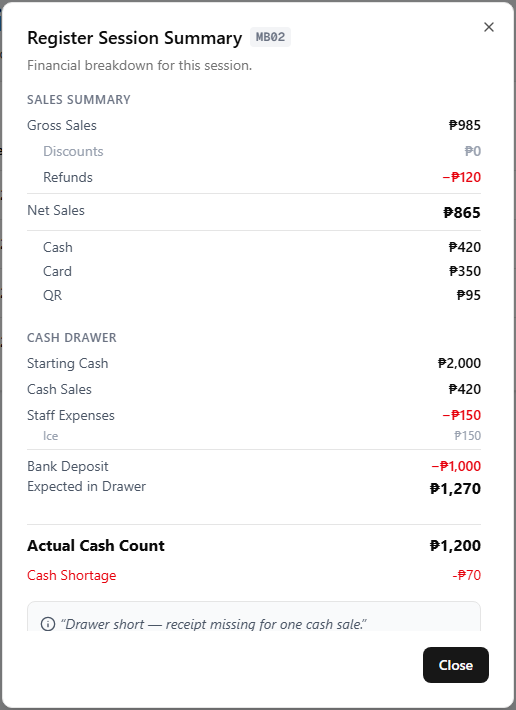
View on any row opens the Register Session Summary — the same close-out breakdown the staff saw when they closed, with the session number shown beside the title.
 1234
12341 Sales Summary — the revenue side of the shift:
- Gross Sales — sales for the shift before discounts and refunds.
- Discounts — the total taken off list prices on the shift's sales.
- Refunds — the total refunded during the shift.
- Net Sales — Gross Sales − Discounts − Refunds: what the shift actually took in.
- Sales by method — Net Sales split across Cash, Card, QR, and Other; each is that method's sales net of its refunds.
2 Cash Drawer — how the Expected in Drawer figure is built up:
- Starting Cash — the opening balance placed in the drawer at open.
- Cash Sales — cash takings for the shift, net of any cash refunds.
- Staff Expenses — cash the staff paid out of the drawer during the shift, itemised line by line; see Recording expenses.
- Bank Deposit / Remittance — cash taken out of the drawer for the bank, for safekeeping, or to hand to the owner.
- Expected in Drawer — Starting Cash + Cash Sales − Staff Expenses − Bank Deposit / Remittance: what should be in the drawer at close.
3 Actual Cash Count & variance — for a closed session the summary ends with these; for an Ongoing session they are omitted and the figures are live up to the moment you open it.
- Actual Cash Count — what the closing staff physically counted.
- Difference — Actual Cash Count − Expected in Drawer. A positive figure is a Cash Overage (blue), a negative one a Cash Shortage (red), and zero means it balanced.
4 Note — the closing staff's note for the session, shown only when one was left — usually the reason for a discrepancy.
The summary is recomputed from the shift's transactions, refunds, and staff expenses — not a stored snapshot — so it always reconciles with Sales History for the same session.
Read next
Open & close register
The staff-side flow that creates each session reviewed here — opening cash, the live dashboard, and the close count.
Sales History
Every individual transaction behind a session's totals, searchable after the fact.
Reading the dashboard
Where these sessions roll up into daily sales and cash figures across your stores.