
Invite franchisees
Franchisees join your brand by signing up on BuddyStall through your franchise's signup link — you never create accounts on their behalf. Share one URL; every owner who creates their account with it starts with your preset already loaded and their business connected to your brand.
Your franchise signup link
Every franchise gets its own invite link when you create the brand. It is the BuddyStall signup page plus a short identifier built from the brand's name:
https://buddystall.com/signup?franchise=kape-tayo-4b1e7d09
Open the franchise's Branding & settings page: the Profile card shows the finished link under Franchisee signup link, with a button that copies it to your clipboard and one that opens it in a new tab so you can check what the franchisee will see.
The identifier is fixed when the brand is created, and renaming the brand does not change it. That is on purpose: a link you handed out months ago has to keep working, whatever you have called the business since.
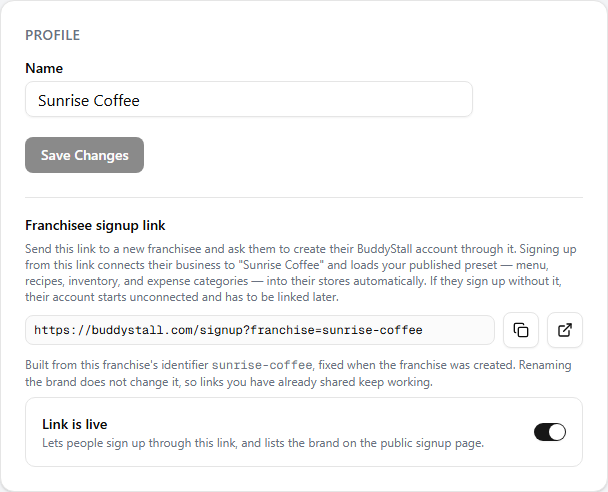
A new brand's signup link starts off, and while it is off nothing resolves: the signup page shows "The specified franchise was not found" and the person would sign up unconnected. Turn it on with the Link is live switch beside the link on the Settings screen. Until you do, the card shows a warning there rather than letting you find out from a franchisee.
Switching it back off has the same effect on every copy already in circulation, so BuddyStall asks you to confirm first. Turning it on again revives the same link.
Share the link
Send the URL directly to prospective franchisees — chat, email, or your onboarding paperwork all work. The link is safe to share widely: it only pre-selects your brand on the signup page; joining still requires the person to create an account, and each signup is a separate, self-contained owner account that pays for its own subscription.
What the franchisee sees
- Opening the link shows the standard BuddyStall signup page with a banner naming your brand — "You're joining Kape Tayo" — with your logo and a note that your menu, recipes, and presets will be applied.
- They create their account — with Google or with email and password. Both paths keep the franchise connection.
- Your preset loads automatically. Right after signup a short loading screen applies your published preset — menu, sizes and add-ons, recipes, inventory items, and expense categories.
- They land in their own dashboard, ready to name their store and start selling with your catalog in place.
The same journey, written for the franchisee, is documented for owners in Connect & sync a franchise — send it along with the link if they want the full walkthrough, including what to do if they signed up without it.
After they join
The new owner is now part of your brand's network:
- Their stores appear across your console — the sales dashboard, stores map, and alerts.
- They can order supplies from your StockHouse.
- Preset changes you publish keep flowing to their stores — see how updates reach stores.
The brand connection is made when the account is created. If someone signs up without the link, or mistypes it, their account starts unconnected — so ask franchisees to open your exact link before creating their account.