
Risk board
The Risk tab is the first tab on the Alerts screen. It takes every open alert in the franchise and turns them into a single ranked list: who to look at, in what order, with the evidence one click below each row.
Read the alerts overview first if you have not — it covers what the screen is for and how this tab pairs with Sales vs Orders.
The screen
 12
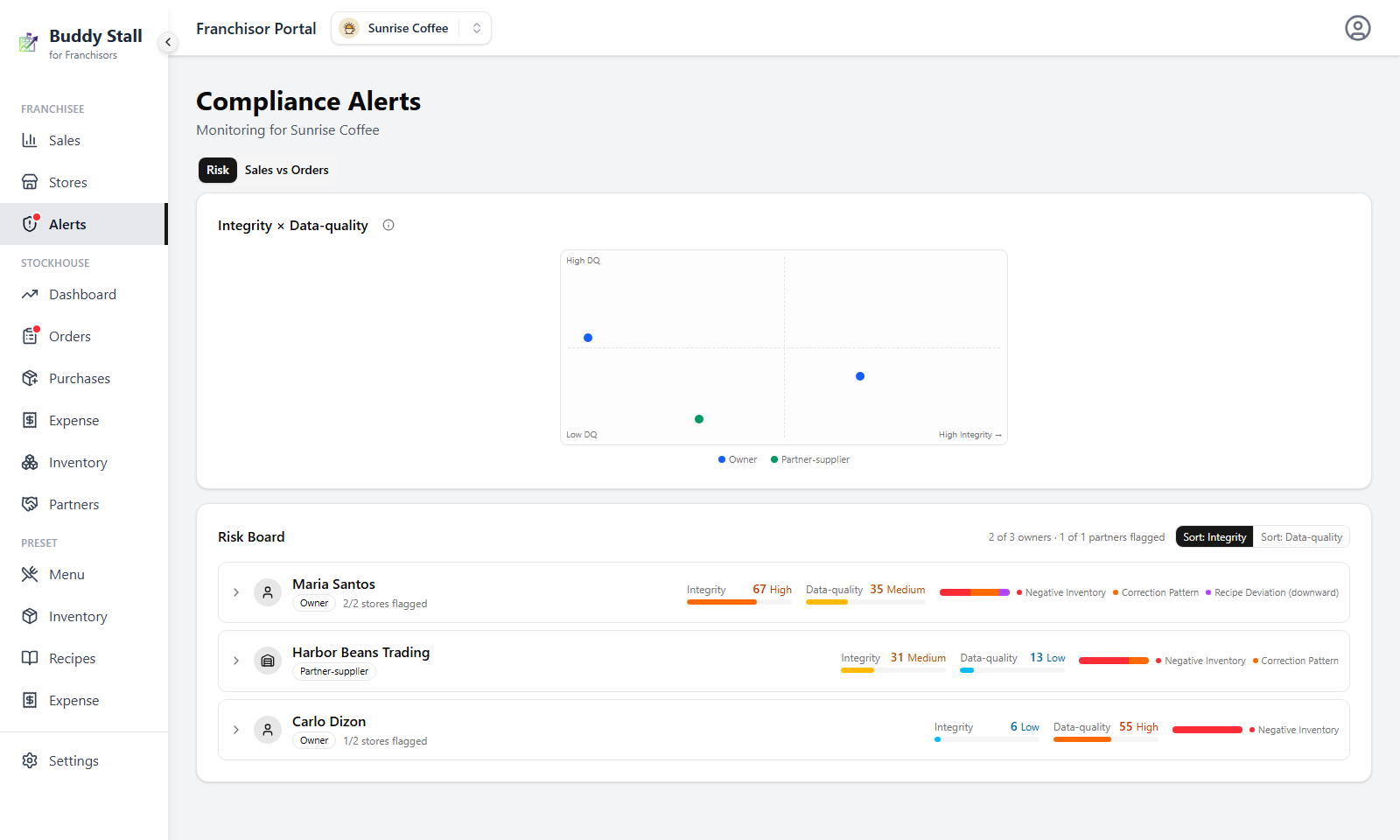
121 The matrix — everyone with a live signal plotted on both scores at once, Integrity left to right and Data-quality bottom to top. It is the quickest read of what kind of problem each one has.
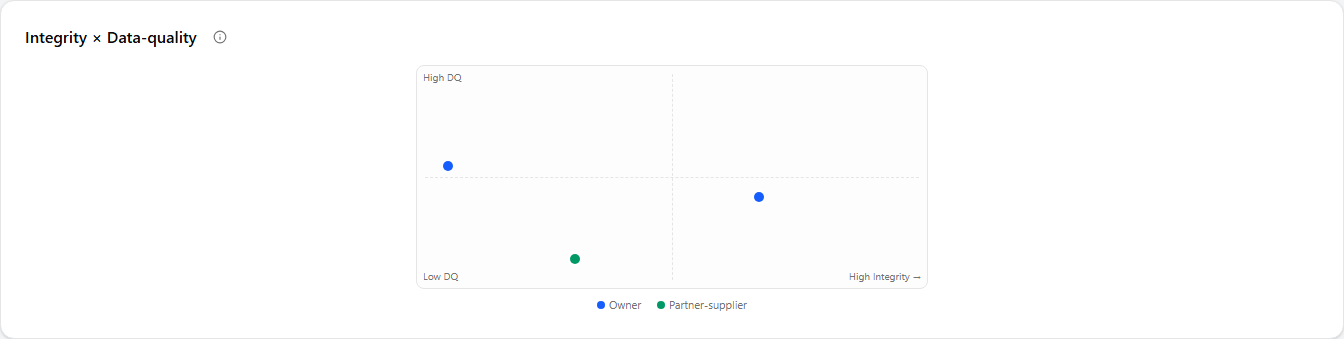
2 The Risk Board — the same entities as a ranked list, worst Integrity first, each row carrying its two scores and expanding into the evidence behind them.
Both are scored in two lanes that are never added together, and everything on this page follows from that split.
Integrity — should I investigate?
Stock that cannot be accounted for: an exclusive item below zero, hand corrections that keep restoring it, a recipe trimmed below your preset. These are the signals that can mean product reached the shelf from outside your channels, so this is the lane that lights the sidebar dot.
Data-quality — should someone fix the records?
Deliveries entered days after they arrived, a portion typed far above the preset. Nothing here suggests missing product — only that the store's records are unreliable, which is a training conversation rather than an investigation.
Keeping the lanes apart is what makes a score readable: a row can sit high on one and at zero on the other, and only the first is worth a phone call.
Neither the matrix nor the board is a roster. An owner or partner-supplier shows up only once one of the two scores rises above zero — anyone sitting at 0 on both is not drawn as a dot and has no row at all, and an entity disappears again the moment both scores return to zero.
The matrix
Blue dots are owners, green dots are partner-suppliers. Hover a dot for its name and both scores; click it to jump straight to that row and open it.
The four corners read straight off the two lanes:
- Bottom-left — nothing to do.
- Bottom-right — high Integrity, clean records. The records are good and they still do not add up. This is the corner to investigate.
- Top-left — messy records, no integrity signal. Retraining, not suspicion.
- Top-right — both. Fix the records first; you cannot investigate a store whose records are unreliable.
The Risk Board
Rows are franchisee owners and partner-suppliers — not stores. A store's problem is its owner's problem, and it is the owner you would talk to, so the board ranks owners and keeps the per-store detail one level down inside the row. It is sorted worst-Integrity-first by default.
 1234
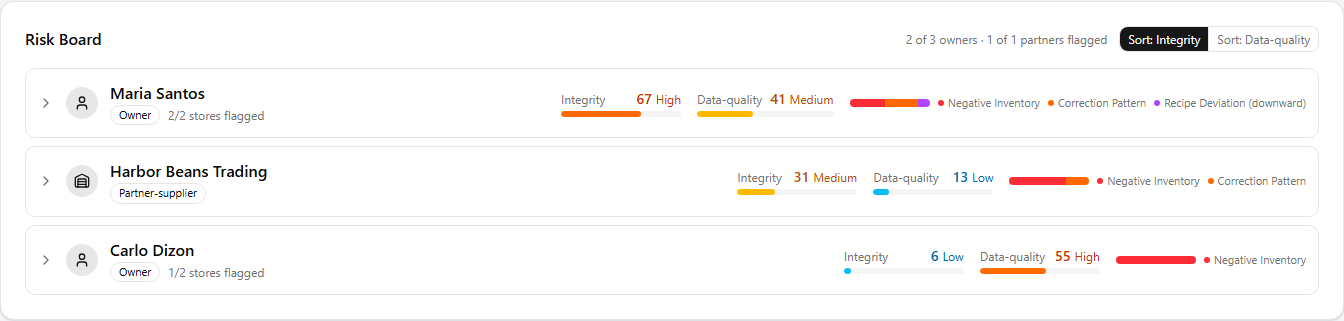
12341 Identity — the owner's or partner-supplier's name, an Owner / Partner-supplier badge, and, for an owner, how many of their stores carry any Integrity signal (2/2 stores flagged).
2 Integrity — the 0–100 score, its band, and a bar. This is the lane the list is ranked on and the one that lights the sidebar dot.
3 Data-quality — the same 0–100 score and bar for the records lane, shown side by side so you never read one as the other.
4 Composition — a small stacked bar breaking down what makes up this row's Integrity signal: Negative Inventory, Correction Pattern, Recipe Deviation (downward).
It shows the mix within that row only — which families are contributing and in what proportion. A wide red segment on one row does not mean more negative inventory than a wide red segment on another. Compare rows by their scores, not their bars.
The header counts, "3 of 12 owners · 1 of 4 partners flagged", count only those with an Integrity signal — usually fewer than the rows below, which include the Data-quality-only ones. Sort: Data-quality re-ranks the list by the other lane, which is how you find the owners who need bookkeeping help rather than a conversation.
Bands and the sidebar dot
Both scores use the same four bands:
- Low (1–24) — one fresh, shallow alert.
- Medium (25–49) — worth a look.
- High (50–74) — ask now.
- Critical (75–100) — several serious signals, or serious and left unaddressed.
Scores rise steeply at first and flatten as they climb — the tenth alert moves the number far less than the second. That keeps a store with a chronic problem from pinning at 100 and hiding everything else.
The dot beside a franchise's Alerts entry is the Integrity band expressed as a colour, nothing else:
- Red — High or Critical.
- Amber — Medium, or a brand-new critical alert that has not yet aged into a band.
- No dot — nothing above Low.
Data-quality never lights the dot: late paperwork is worth fixing, but it is not worth interrupting you for. There are no emails for compliance alerts — the dot is how you find out.
Opening a row
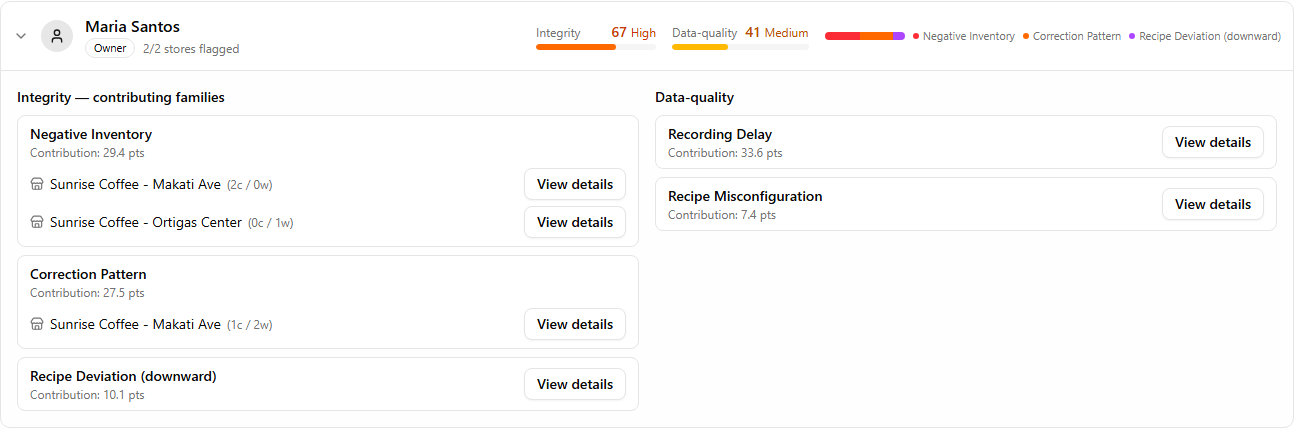
Clicking a row expands it in place, into the two lanes side by side — the same Integrity and Data-quality split, now itemised into the families that built each score.
 12
121 Integrity — contributing families lists each family that fired with the points it contributes: Negative Inventory, Correction Pattern, and Recipe Deviation (downward). For an owner, Negative Inventory and Correction Pattern break down per store, each line showing the store's critical / warning counts (2c / 0w) and its own View details button.
2 Data-quality lists Recording Delay and Recipe Misconfiguration (a recipe set above preset) the same way — the records-lane families, kept on their own side so a training issue never inflates the investigation score.
The contribution figures split the row's 0–100 score across whatever fired, so they add up to the score you see on the row. They are a breakdown for reading, not separately meaningful numbers.
How a score is calculated
Three things shape the number. Severity and age lift a score the same way in every family; family weight is where the families differ.
Severity
A critical alert counts for roughly twice a warning — and the deeper past its line it sits, the higher it scores.
Age
An alert still open after 8 days, then again after 15 days, counts for more than a fresh one.
Family weight
Negative Inventory and Correction Pattern carry full Integrity weight; Recipe Deviation (downward) counts less on its own — evidence of intent rather than of stock actually gone.
How an owner's stores roll up
An owner's Integrity score is not the sum of their stores. The worst store dominates, and every other flagged store adds only a fraction on top.
Without that, an owner with ten stores would out-rank an owner with two on breadth alone, and the board would just be a store-count ranking. With it, one badly-behaving store puts its owner near the top no matter how small they are — which is the behaviour you want.
Recipe deviations belong to the owner rather than to any one store, since a recipe is set once for the whole master menu, and are added at the owner level.
The drill-downs
Every View details button opens a dialog listing the individual alerts behind that number, each noting the severity thresholds that lift its score. On a phone the same tables render as stacked cards.
Negative Inventory
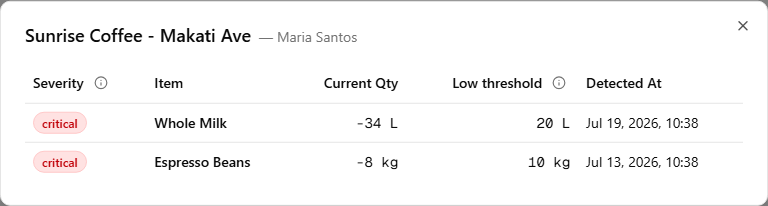
Headed by the store and its owner. One row per item: severity, item, current quantity, the low threshold it is measured against, and when it was detected. Severity tracks the depth — warning while the deficit is shallower than 30% of that threshold, critical at 30% or deeper.
Whole Milk · low-stock threshold 20 L
The threshold shown is your preset threshold, not the store's own. A store cannot edit it, so it cannot be inflated to keep an item quietly out of range.
The alert clears itself: the moment the item's balance is back at zero or above, the row drops off the board with no action from you.
Correction
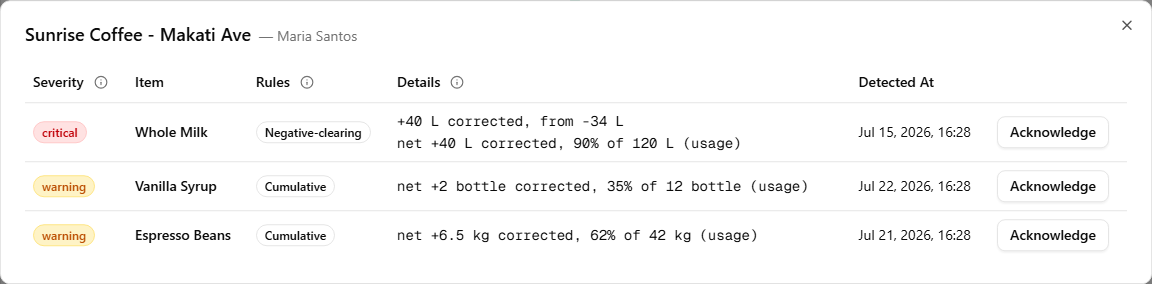
Headed by the store (or the partner-supplier). One row per item: severity, item, the rule(s) that fired, the details behind them, and when it was detected — plus an Acknowledge button on each row.
Each row names the rule that fired — tap the badge for its full description:
- Cumulative — each stocktake correction is the gap between the stock the app expected and the amount actually counted. Over the evaluation period, their running net reaches a large fraction of the item's throughput: measured against the larger of the item's consumption or its preset threshold, warning at 30%, critical at 80%. The evaluation period closes once the item has consumed twice its preset low-stock threshold — or after 30 days, whichever comes first.
Whole Milk · 50 L used this period
- Negative-clearing — an upward correction was recorded while the item's stock was already negative. The correction wiped out a deficit rather than fixing a miscount — the single strongest pattern the console recognises, and it carries extra weight.
Whole Milk · low-stock threshold 20 L
The Details column shows only the figures that drive the rule that fired — a cumulative row reads net +12 L corrected, 60% of 20 L (usage); a negative-clearing row reads +8 kg corrected, from −6 kg.
A correction alert waits 72 hours before it reaches the board — the most common innocent cause, a delivery entered a day or two late, leaves exactly the same trace as an unrecorded purchase. If a delivery recorded inside that window explains it, the alert never reaches the Integrity lane at all: it is counted once as Recording Delay on Data-quality instead. What does reach the board has already survived the most common honest explanation.
Acknowledging. A correction is a past event that will not undo itself, so — unlike a negative balance or a trimmed recipe — an ignored correction alert never simply times out. A Cumulative signal can still fade on its own: its window keeps widening, so ordinary consumption dilutes an old correction's share until the ratio falls back under the line and it clears. A Negative-clearing signal, the stronger pattern, does not dilute — it stays until you act on it.
So when one reaches the board, look at the row and decide what it is: a possible sign of stock sourced from outside your channels, or just an operational slip — a miscount, or a delivery keyed in wrong. Once you have checked and are satisfied there is nothing to pursue, Acknowledge the alert to clear it and drop it off the board.
Recipe Deviation (downward)
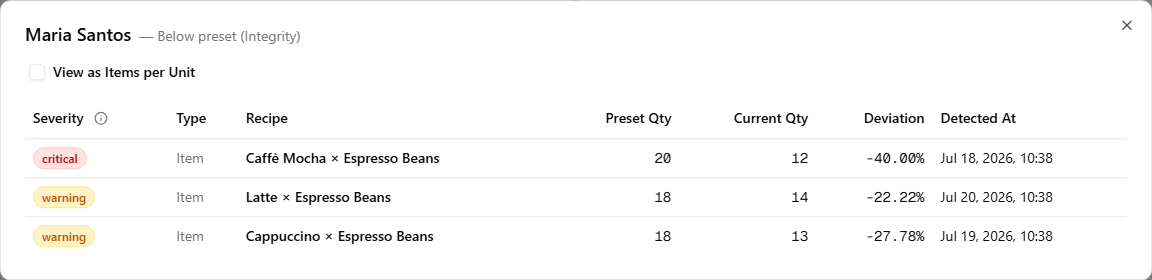
The Integrity drill-down — recipes a store trimmed below the preset portion, so each sale deducts less than it should. Headed by the owner and filtered to the below-preset direction, so the list always matches the number you clicked. It scores warning at 15% or more below preset, critical at 35% or more.
Latte recipe · Whole Milk portion, preset 20 g
Each row shows the recipe, the preset quantity, the current quantity, and the deviation. The View as Items per Unit checkbox flips the two quantity columns from how much of the ingredient per item to how many items per unit of the ingredient, which is often the easier way to see what a trimmed portion actually means.
This alert clears itself too: set the recipe back within the preset range — in either direction — and the row leaves the board with no action from you.
Recipe Misconfiguration (above preset)
The Data-quality face of the same dialog — recipes set far above the preset portion. It scores warning at 50% or more above, critical at 100% or more; at double the preset portion it is a typo, not a policy, and it corrupts every sale-time deduction until someone corrects it. Same columns and the same View as Items per Unit toggle, filtered to the above-preset direction.
Latte recipe · Whole Milk portion, preset 20 g

Recording Delay
The most common way a correction balloons into a large value is not misconduct — it is a handling slip. Stock physically arrives (an order is received, or units are moved in from another store) and lands on the shelf, but nobody records it in the system. Real stock and system stock drift apart, and a count taken in that state posts one big fictitious gap: the shelf holds what it should, the records simply never caught up.
That gap is an operating mistake, not a compliance concern — so it is kept out of the Integrity lane. When a restock recorded within 72 hours accounts for the correction (the late order or transfer that was already on the shelf), the event never reaches the investigation score. It is counted here instead, on Data-quality, where it raises the owner's data-quality score — the signal that flags someone still finding their feet with the system as a coaching target rather than one to investigate.
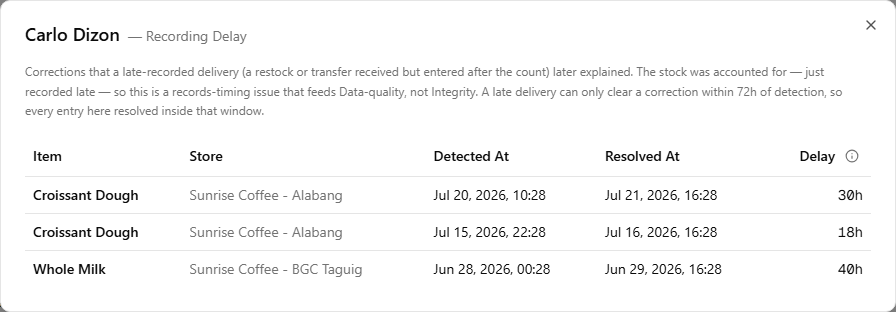
One row per event: item, store, when the correction was detected, when the delayed record cleared it, and the delay between the two. Every entry here resolved within 72 hours, because that is the only window in which a late record can still explain a correction. These fade with time — the console looks back 90 days and recent events weigh far more than old ones — so an owner who tightens up their recording habits drifts back down on their own.
When the board is empty
Nothing to review — no active integrity or data-quality signal for this franchise.
That is the normal state for a healthy franchise — every owner and partner-supplier is at zero on both lanes, so none of them is listed.