
Presets overview
A preset is a master definition you publish for a franchise — a menu , an inventory, a recipe, or an expense item — that every connected store loads into its own setup. Presets are how a brand stays consistent: you decide the catalog once, and your franchisees build on top of it instead of starting from a blank slate.
But a preset is more than a starting catalog. It is the reference the rest of the console is built on: your stockhouse holds what the preset inventory lists, the price a store pays comes from the preset, and compliance alerts are measured against preset values. This page explains those connections before you start filling the catalogs in.
What you publish as a preset
There are four preset catalogs, and together they describe everything the brand standard covers.
Menu
The brand's sellable catalog: categories, items, the sizes each category offers, and the add-ons that go with them. The price you set on an item travels with it as the starting price for the whole network.
Inventory
The inventory items the brand runs on — ingredients, supplies, packaging — each with the unit it is counted in, its cost per unit, its low-stock threshold, and whether it is Franchisor-exclusive. This is the catalog your stockhouse is built from and the one compliance alerts are measured against, so it carries the most weight of the four.
Recipes
How much of which inventory item every menu item and size consumes. Recipes are what make a sale account for the stock behind it, and the amounts you set here are the baseline recipe deviation is judged against.
Expenses
The expense items spending is recorded against, grouped into categories like Material, Utility, or Rent. Defining them once is what makes costs comparable across the network instead of one free-form label per location.
The Franchisor-exclusive switch
Many franchises run on supplying their stores — the brand earns a margin on every bag of beans or bottle of syrup a franchisee is required to buy from it. BuddyStall supports that model directly: you mark which inventory items must come from you, and the console holds the rule from there.
Every preset inventory item carries it — Franchisor-exclusive — and it is the most consequential setting in the whole console. Turning it on ties the item's supply to you — and switches on the monitoring that tells you whether that holds in practice.
Leave it off (the default) and the item shows Any supplier: the store buys it wherever it likes and owns its cost. Turn it on and the item carries the amber Franchisor Only badge everywhere it appears.
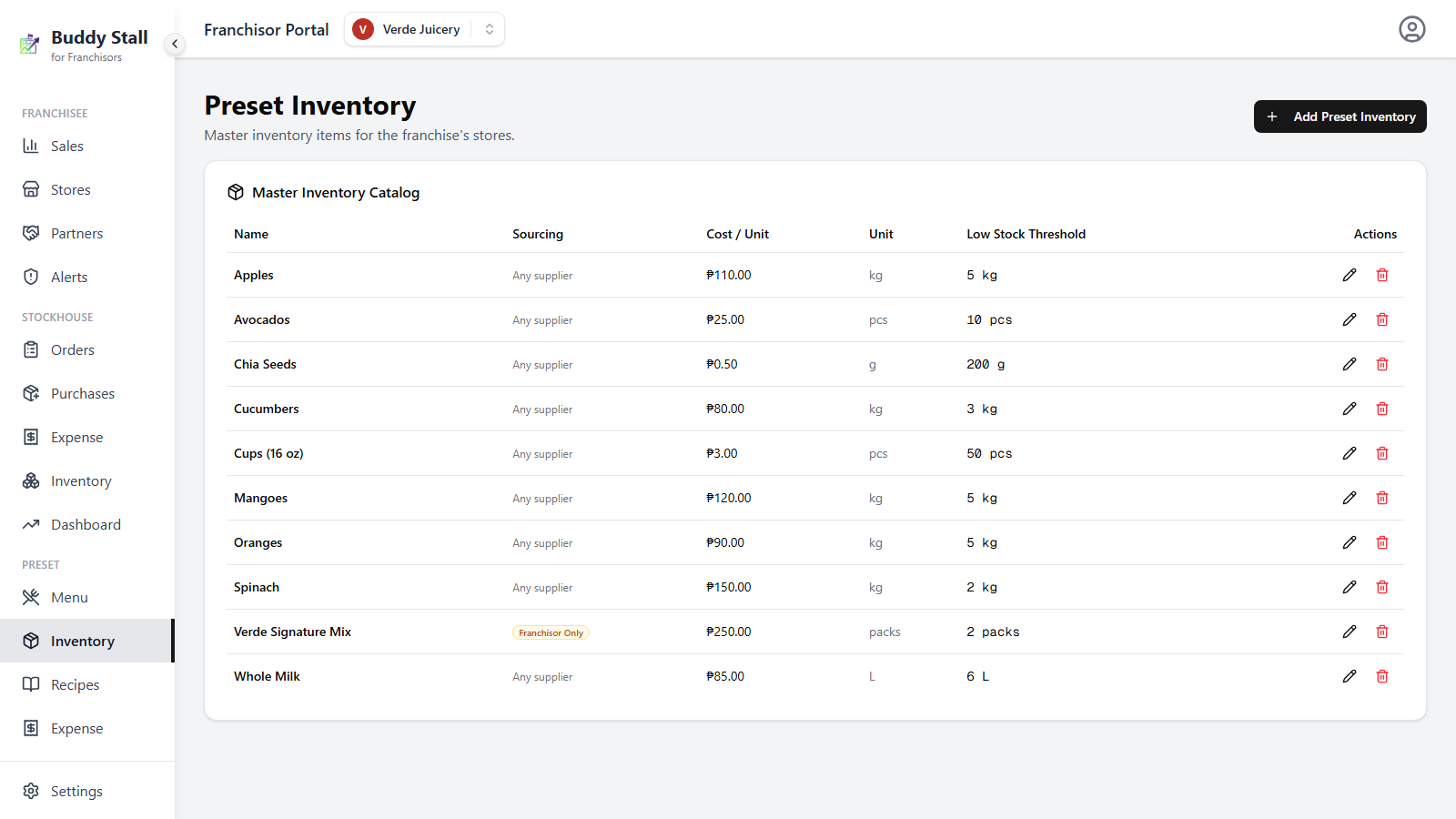
Exclusivity is the right setting for the proprietary inventory items that define your brand — the ones that must come from your stockhouse. For everything a store can reasonably buy locally, leave the switch off: stores keep control of their own cost and sourcing, and you avoid becoming the bottleneck on a bag of sugar.
Presets and franchise sales
Your sales dashboard counts only what came from the preset menu. When a store sells an item it loaded from your preset menu, that sale rolls up to you; when it sells an item its owner added on their own, that sale stays on the store side and never reaches your network totals.
This keeps the network view brand-only: what you measure is your own menu selling across every store, uncoloured by each franchisee's local additions. The more of your catalog a store actually adopts, the more complete its contribution to your dashboard.
Presets and your stockhouse
Your stockhouse is the warehouse you supply franchisees from, and it is built directly on the preset catalog: each stockhouse item is one preset inventory item. You cannot hold warehouse stock for something the preset does not list, so the catalog always comes first.
Presets and compliance alerts
Compliance alerts catch off-book sourcing and recipe drift. They work by comparing what a store actually does against the preset values you set — which is why the numbers you type into a preset are worth thinking about twice.
The preset threshold and recipe amount are the reference each alert is judged against — a store cannot quiet a signal by editing its own copy. The alerts overview covers exactly what fires and when.
Every compliance alert is gated on the Franchisor-exclusive switch. If nothing in a franchise's preset inventory is marked exclusive, its compliance screen stays empty forever — not because the network is clean, but because there is nothing being watched. Mark the inventory items you supply, and the monitoring turns on with them.
Set up each catalog
Preset menu
Define the brand's categories, items, sizes, and add-ons.
Preset inventory
Define the inventory items stores track, with units, costs, and sourcing.
Preset recipes
Link menu items to inventory items, so every sale deducts stock.
Preset expenses
Define the expense items stores record their spending against.